
A bin location system gives every storage spot a unique address so staff can find and put away inventory without guessing. The payoff is faster picks and fewer errors, but only if the addresses are consistent. Start now: pick a simple naming convention and build a location master before you label a single shelf.
TL;DR:
- A consistent bin location naming convention is essential, with codes formatted from broad to specific, such as zone, aisle, rack, level, and position.
- Implementation can be done in weeks for small warehouses, but larger facilities require phased rollouts, with pilot testing in slow-moving zones to reduce costs.
- Labels must combine human-readable text and a barcode or QR code, mounted consistently and tested with actual scanners to ensure reliability.
- Fixed locations suit small, stable inventories, while chaotic or hybrid methods optimize space and require real-time WMS tracking, especially for high SKU variability.
- Regular maintenance, including spot checks and KPI monitoring, prevents system confusion caused by inconsistent labeling, outdated codes, or overcomplicated formats.
Table of Contents
- What Is a Bin Location System and Why Does It Matter?
- What Business Outcomes Should You Expect to Measure?
- How Do You Design a Bin Numbering Convention That Scales?
- What Does a Realistic Implementation Timeline Look Like?
- How Should You Label Bins So Scanners Actually Read Them?
- Fixed, Chaotic, or Hybrid: Which Storage Assignment Method Fits?
- What Technology Actually Supports a Bin Location System?
- What Mistakes Undermine a Bin Location System Over Time?
- What We’ve Learned Watching Bin Systems Succeed or Fail
- Sources
- FAQ
What Is a Bin Location System and Why Does It Matter?
A bin location assigns a unique address to every storage spot in your facility. A typical code might read A1R3L2P05, breaking down to Zone A, Aisle 1, Rack 3, Level 2, Position 5. That structure lets any employee, or any scanner, find a spot without asking a supervisor. Setting up a warehouse bin location system turns tribal knowledge into a documented map that anyone can follow.
A spreadsheet can carry a small operation for a while. It works when you have a handful of SKUs and low order volume, because someone can still eyeball a sheet and find what they need. That stops being true once you’re managing multiple SKUs with frequent movement. At that point, a WMS becomes essential for real-time accuracy, because manual updates can’t keep pace with the volume of changes.
The gap between a labeled warehouse and an unlabeled one shows up in two places: how long it takes to find a product, and how often the wrong one gets picked. Both costs compound as order volume grows, which is exactly why smaller operations tend to delay fixing it until the problem gets expensive.
What Business Outcomes Should You Expect to Measure?
The clearest signal a bin location system is working shows up in your pick data within the first month. Time-per-pick drops because staff stop walking the floor looking for product, and picks-per-hour climbs as a direct result. Inventory accuracy improves too, since a defined address for every SKU removes the guesswork that causes mis-picks.
Track these outcomes and report them up:
- Average time per pick, measured before and after rollout
- Picks per labor hour, a direct throughput metric
- Inventory accuracy rate, from cycle counts against system records
- Mis-pick rate, tracked as a percentage of total order lines
- Space utilization, how much of your cubic storage is actually productive
- Cycle count variance, how far physical counts drift from system counts over time
A well-run bin location system makes cycle counting faster too, since counters can work bin by bin instead of hunting across the building. That’s the number leadership usually cares about most: less labor spent reconciling inventory that should already be accurate.
How Do You Design a Bin Numbering Convention That Scales?
Build your code hierarchy from broad to specific: zone, then aisle, then rack, then level, then position. That order mirrors how a picker actually walks the floor, so the code reads the way the physical path works.
Formatting matters more than most teams expect. Shopify’s guidance on bin locations recommends consistent formats and leading zeros, so location 5 sorts as “05” and stays ahead of “50” instead of behind it. Bin names also need to stay unique within a location, which sounds obvious until two teams independently create “A1” in different buildings.
A few rules keep the convention usable as you grow:
- Zero-pad every segment (01, not 1) so location lists sort correctly
- Ban ambiguous characters like the letter O and the letter I, since they’re easy to confuse with 0 and 1 on a label
- Use a single separator style (hyphens or none) and apply it everywhere
- Reserve number ranges for future zones so adding capacity doesn’t force a renumbering project
Three formats work at different scales. A minimal format for a single small room might be just A01, A02, A03. A standard format adds a level, like A01L2. An extended format for a multi-zone facility carries all five segments, like A01R03L2P05. Pick the smallest format that covers your current footprint, then leave room in the numbering to grow into the next tier without starting over.
What Does a Realistic Implementation Timeline Look Like?
A phased rollout keeps a bin location project from turning into a months-long slog. A practical implementation sequence runs through six stages, and most small operations can move through all of them in a matter of weeks.
- Assess and map the physical layout. Walk every aisle, rack, and shelf, and document what’s actually there before you design anything on paper.
- Build the location master. Create the master list of every bin code, tied to zone, aisle, rack, and capacity, then validate it against the physical walk.
- Prepare and test labels. Print a small batch first and confirm they scan cleanly before committing to a full print run.
- Configure your system. Load the location master into your WMS or inventory tool and set up scan-verify flows for putaway and picking.
- Pilot in one zone. Run the new system in a limited area, measure results, and fix naming or scanning issues before they spread.
- Train staff and roll out in phases. Expand zone by zone, training each team as you go rather than flipping the whole warehouse at once.
A small site can often complete implementation in a few weeks, while larger or multi-zone facilities usually take longer, often several weeks to a few months, following a phased approach. Cost drivers are straightforward: label stock and printers, scanner hardware if you don’t already own it, and staff hours for mapping and training. Software licensing only enters the picture if you’re upgrading to a WMS.
Pro Tip: Pilot in your slowest-moving zone first, not your busiest one. Mistakes in naming or label placement are cheaper to fix when they’re not blocking your highest-volume picks.
How Should You Label Bins So Scanners Actually Read Them?
Every label needs two things: text a human can read at a glance, and a barcode or QR code a scanner can read without hesitation. Skip either one and you’ve built a system that only works half the time.
Material choice depends on where the label lives. Adhesive labels work fine on shelving in a climate-controlled area, but they peel and fade fast in a freezer or near a loading dock. Metal plates or laminated tags hold up better on racking exposed to weather or heavy handling, and floor tape needs a rated adhesive built for forklift traffic, not general-purpose vinyl.
Placement and testing matter as much as material:
- Mount labels at consistent height and orientation across the whole facility, so scanners don’t need to hunt for them
- Color code by zone to give staff a fast visual cue before they even read the code
- Match symbology to your scanner hardware, since older 1D scanners can’t read a 2D QR code
- Test a sample batch on the actual scanner model before committing to a full print run, since label durability and scanner compatibility are the most common source of read failures on the floor
Pro Tip: Print ten sample labels and scan every one with the actual handheld device your team will use, not a phone camera. A code that scans fine on your desk can fail under warehouse lighting.
Fixed, Chaotic, or Hybrid: Which Storage Assignment Method Fits?
Fixed locations assign every SKU a permanent home. That’s simple to train and easy for staff to memorize, which makes it a solid fit for smaller SKU counts with stable demand. The tradeoff is wasted space, since a bin sits empty whenever that SKU is out of stock.
Chaotic, or random, storage lets any SKU go into any open bin, tracked entirely by system record rather than memory. It maximizes space utilization but only works if your WMS can reliably track locations in real time, since no human can memorize a random layout.
A hybrid approach, fixed pick faces paired with chaotic reserve storage, tends to deliver the best balance for operations juggling both fast and slow movers. Before choosing, run through this checklist:
- SKU velocity: fast movers benefit from fixed, easy-to-remember pick faces
- SKU count and variability: high SKU counts favor chaotic or hybrid for space efficiency
- WMS readiness: chaotic storage requires real-time system tracking, not paper lists
- Labor model: new or temporary staff perform better with fixed locations they can learn quickly
What Technology Actually Supports a Bin Location System?
You don’t need automation to start. Barcode labels paired with a handheld or mobile scanner cover the minimum viable setup, and that combination alone eliminates most of the manual lookup errors that plague an unlabeled warehouse.
A WMS becomes worth the investment once you need real-time location updates, optimized pick paths, or automated slotting recommendations. Barcode scanning enforced through scan-verify workflows at putaway and picking is the baseline control most operations should have before considering anything more advanced.
RFID and automated storage and retrieval systems (AS/RS) sit at the top of the investment curve. They cut labor further and speed up high-volume operations, but the return only pencils out at scale, so most small and mid-sized operations should treat them as a later-stage upgrade rather than a starting point.
A few integration checks prevent expensive surprises:
- Confirm sort order matches your numbering convention before go-live, so location lists display correctly
- Verify label codes match system records exactly, including capitalization and separators
- Build a fallback procedure for scanner outages, so staff can still pick and put away manually without halting operations
- Test with real order volume, not a handful of sample SKUs, before trusting the system fully
What Mistakes Undermine a Bin Location System Over Time?
The most common failure is overcomplicating the code. A ten-character location string with three separator styles is harder to train and easier to mistype than a clean, consistent format. Inconsistent labeling, mixing formats between zones or skipping labels on new racking, creates the same confusion a bin system is supposed to solve. A third mistake is never retiring old locations, so the system fills up with dead codes nobody bothers to clean out.
Governance keeps the system honest. Maintain one location master as the single source of truth, require a change control step before anyone adds or removes a bin, and run spot checks regularly rather than waiting for a full count to reveal problems.
A simple maintenance cadence works for most operations:
- Daily: spot check a handful of bins against system records
- Weekly: run cycle counts on high-velocity zones
- Quarterly: review slotting and reassign bins if demand patterns have shifted
| KPI | Warning threshold | Action trigger |
|---|---|---|
| Cycle count variance | Above 2% | Investigate labeling or process gaps |
| Mis-pick rate | Rising month over month | Re-slot high-traffic bins |
| Label scan failures | Recurring in one zone | Relabel and retest that zone |
What We’ve Learned Watching Bin Systems Succeed or Fail
Start simple. The operations that get this right don’t design a perfect system on day one, they pick a clean naming convention, label one zone, and fix problems before scaling to the rest of the building. A pilot zone catches naming mistakes and scanning gaps while the cost of a wrong turn is still small.
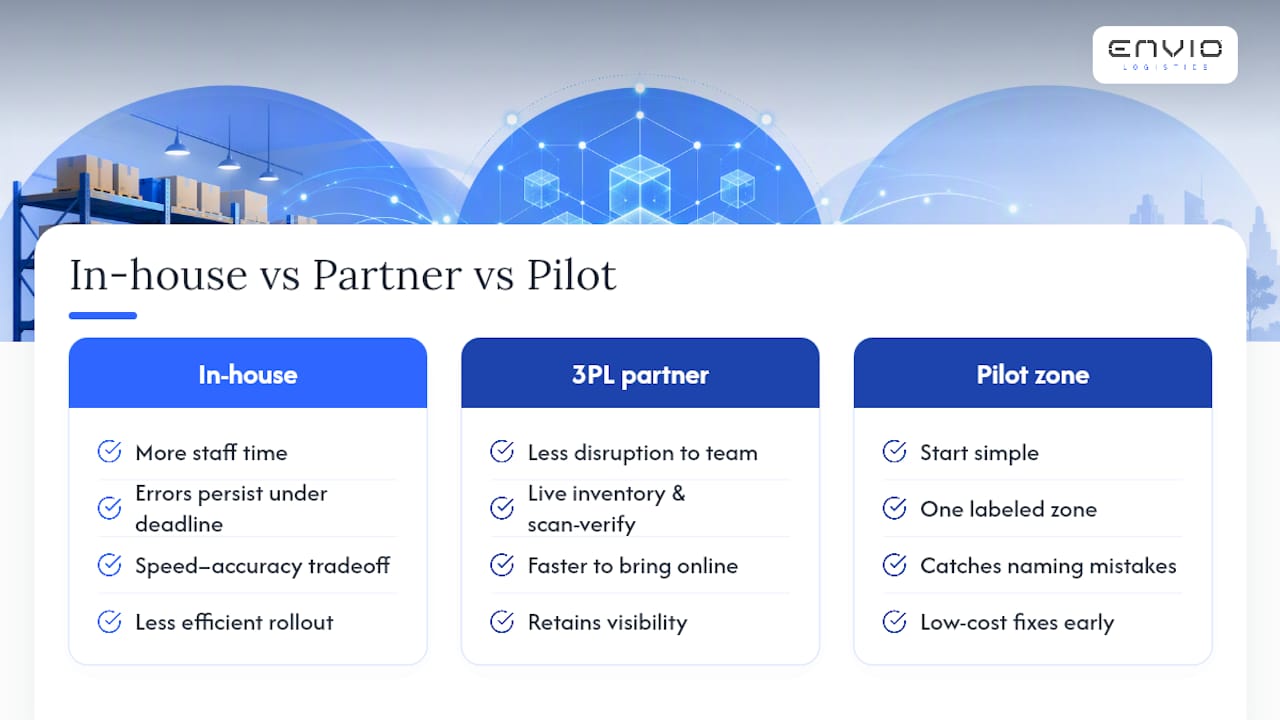
The real tradeoff is speed versus accuracy, and also who does the work. Building a bin location system in-house takes staff time away from daily operations, and mistakes made under deadline pressure tend to stick around for months. That’s where working with a 3PL warehousing partner changes the equation. A partner that already runs live inventory tracking and scan-verify workflows can bring a location system online more efficiently, reducing disruption to your own team and minimizing trial-and-error costs.
Poorly managed inventory data creates ripple effects far beyond the warehouse floor, from stockouts to inaccurate demand forecasting, so getting the location system right early pays off across the business, not just on the pick line.
— Claudio Saenz
Outsourcing the physical setup doesn’t mean losing visibility. If you’re weighing whether to build this in-house or hand it to a partner, look at Envio’s fulfillment and warehousing services for live inventory access and same-day shipping on orders placed by 1PM CST, with no long-term contract locking you in. Brands preparing inventory for retail channels can also review Amazon and Walmart prep services to see how bin-level organization carries through to marketplace compliance.
Sources
- Setting Up a Warehouse Bin Location System
- Bin Location Management: Complete Guide for Warehouses
- How to Set Up Bin Locations | Racklify
FAQ
What Is a Bin Location Code?
A bin location code is the unique identifier assigned to a single storage spot, typically combining zone, aisle, rack, level, and position into one string, such as A1R3L2P05.
How Do I Create a Bin Location?
Walk your facility to map the physical layout, build a location master listing every bin with its code and capacity, then print and test labels before loading the codes into your inventory system.
What Is a Bin System?
A bin system, or bin location system, is a method of assigning a unique address to every storage spot in a warehouse so staff and scanners can locate inventory quickly and accurately.
Should I Use Fixed or Chaotic Bin Locations?
Fixed locations work best for smaller SKU counts and stable demand, while chaotic storage maximizes space but requires a WMS to track locations in real time; a hybrid of both suits mixed-velocity inventory.
What Are the Top WMS Systems for Bin Location Tracking?
WMS options vary widely by warehouse size and budget, and the right fit depends on your SKU count, order volume, and whether you need features like real-time slotting or RFID integration rather than a single universal answer.
0 comments