
Ecommerce integration connects your storefront to the systems that run your business, like ERP, WMS, payment processors, and 3PLs, so an order placed at 2:14 AM updates inventory, triggers fulfillment, and posts to your books without anyone touching a keyboard. The immediate payoff is fewer oversold items and faster order-to-ship times. Getting there starts with two decisions: which system owns each piece of data, and how much of the connection you build versus buy.
TL;DR:
- Connecting inventory, order management, and shipping systems with real-time data reduces oversells, speeds up fulfillment, and improves financial accuracy.
- Prioritize linking inventory management first, followed by automating order and shipping workflows, then integrating customer data and marketplaces to streamline operations.
- Use event-driven APIs with webhooks rather than polling, and choose middleware solutions like iPaaS when managing more than six direct point-to-point connections.
- Clearly define system ownership of data, perform SKU audits, and establish operational protocols to prevent silent failures and maintain data integrity.
- Outsourcing fulfillment integration to providers like Envio can simplify complexity, ensure compliance, and free internal resources for growth initiatives.
Table of Contents
- What Is Ecommerce Integration and Why It Matters for Growing Stores
- Common Integrations and Where to Start Connecting Systems
- Which Integration Architecture Fits Your Growth Stage?
- Planning Ahead: Data Readiness and System Ownership
- What Does Implementation Actually Cost and How Long Does It Take?
- Operational Rules That Prevent Integration Failures
- How Do You Choose the Right Integration Approach for Your Size?
- How Envio Handles Fulfillment Integration in Practice
- Security and Compliance Considerations You Can’t Skip
- Performance and Scalability Challenges as Order Volume Grows
- Testing Strategies Before You Flip the Switch
- Managing Versions and Changes Without Breaking Production
- Real Examples of Integration Done Right
- Why Most Integration Advice Skips the Hard Part
- A Simpler Path: Letting a 3PL Own the Integration Complexity
- Sources
- FAQ
What Is Ecommerce Integration and Why It Matters for Growing Stores
Picture a single order moving through a store that has scaled past spreadsheets. The customer checks out on Shopify or WooCommerce. That order needs to hit your warehouse management system so a picker knows what to grab, your ERP so accounting can recognize revenue, and your carrier account so a label prints and a tracking number gets emailed back to the customer. Without integration, someone is doing at least one of those steps by hand, usually by exporting a CSV file and importing it somewhere else.
That manual bridge is where growing stores lose money. A warehouse team working from a spreadsheet that’s four hours stale will sell inventory that’s already gone. NetSuite’s research on ecommerce integration points to exactly this: connecting your storefront to ERP automates order processing, inventory updates, and financial records, cutting out the manual reconciliation that eats a bookkeeper’s Friday afternoon.
The business case goes beyond back-office relief. Harvard Business Review’s study of 46,000 shoppers found that customers who buy across connected channels spend more and return more often than single-channel shoppers. Integration is what makes those channels behave like one system instead of three disconnected ones.
The operational wins usually show up in three places:
- Fewer oversells. Real-time stock counts across every sales channel mean you stop promising inventory you don’t have.
- Faster fulfillment. Orders route to the warehouse or 3PL automatically instead of waiting for someone to notice a new email.
- Cleaner financials. Revenue, tax, and cost of goods sold post to your ERP without a human retyping numbers.
Mobile buying makes this more urgent, not less. Statista’s data on mobile commerce revenue shows how much purchasing now happens on phones, often on impulse, which leaves zero room for stale inventory counts to embarrass you at checkout.
Common Integrations and Where to Start Connecting Systems
Not every connection matters equally on day one. Here’s the order that tends to pay off fastest for a store moving past the DIY stage:
-
Inventory and warehouse management (WMS). This is the connection that stops oversells cold. If you sell from more than one location or channel, a shopify warehouse integration or equivalent WooCommerce fulfillment integration syncing stock counts in near real time should be your first project, not your fifth.
-
Order management and ERP. Once inventory is solid, connect order data to your ERP so invoicing, tax calculation, and revenue recognition happen automatically. This is the piece NetSuite’s guidance identifies as the biggest source of manual reconciliation work when it’s missing.
-
Shipping, carriers, and 3PL. A shopify 3pl integration or similar connection to your fulfillment partner should push order details out automatically and pull tracking numbers back in. This is also where a shopify fulfillment integration typically lives, connecting your storefront directly to a warehouse’s pick-and-pack queue.
-
Payment processing and reconciliation. Payment gateways need to talk to your accounting system so deposits, fees, and refunds match what actually landed in your bank account. Manual matching here is a classic source of monthly close delays.
-
CRM and customer data. Once operations are stable, connecting customer purchase history to a CRM lets marketing and support teams work from the same picture instead of guessing.
-
PIM (product information management). For catalogs with more than a few hundred SKUs, a PIM keeps titles, images, and specs consistent across every channel instead of drifting apart.
-
Marketplaces and EDI. A walmart marketplace integration or Amazon Seller Central connection often requires EDI-style data exchange with strict formatting rules. These are worth tackling once your core inventory and order pipeline is proven, not before.
The pattern across all seven: fix the data that causes customer-facing problems first (inventory, orders, shipping), then layer in the connections that make internal teams more efficient (CRM, PIM, marketplaces).
Which Integration Architecture Fits Your Growth Stage?
The technical pattern you choose determines how much maintenance debt you’re signing up for. Three architectures dominate ecommerce API solutions today, and picking the wrong one for your size is the single most common integration mistake.
Batch versus event-driven sync is the first fork in the road. Batch jobs that poll a system every 15 or 30 minutes are simple to set up but create a window where oversells happen: someone buys the last unit on Amazon, and your Shopify store still shows it in stock until the next poll runs. Event-driven sync, triggered by webhooks the moment something changes, closes that gap. Shopify’s own engineering guidance on data integration challenges recommends exactly this shift, away from polling and toward real-time event architecture, because it removes the fragile timing dependencies that batch jobs introduce.
Point-to-point connections work fine when you have two or three systems talking to each other. Add a fourth or fifth system, and every new connector multiplies the number of relationships you have to maintain and debug. Middleware platforms, often called iPaaS (integration platform as a service), solve this by giving every system one connection to a central hub instead of direct links to everything else.
- Point-to-point: fast to build, cheap at first, expensive to untangle later.
- iPaaS/middleware: more setup cost, dramatically lower long-term maintenance as you add channels.
- Enterprise service bus (ESB): justified once you’re running a dozen-plus systems with complex transformation logic, rarely needed before that scale.
An API-first approach with a canonical data model, one agreed-upon definition of what a “product” or “order” record looks like, is the long-term fix regardless of which architecture you pick. It’s what keeps a new connector from becoming a custom translation project every time.
Pro Tip: Before adding a fourth system to your stack, map how many point-to-point connections you’d need versus a single middleware hub. If the math shows more than six direct connections, iPaaS almost always wins on total cost.
Planning Ahead: Data Readiness and System Ownership
Most integration failures trace back to a planning step nobody did: deciding which system is the source of truth. Skip this, and you’ll spend months chasing conflicting data between platforms that each think they’re right.
-
Assign a system of record for each data domain. Products usually live in your PIM or ERP. Customer data usually lives in your storefront or CRM. Orders belong to whichever system processes the transaction first. Write this down before connecting anything.
-
Reconcile your SKUs. Duplicate SKUs, inconsistent units of measure, and mismatched tax codes are the quiet killers of integration projects. If your Shopify SKU is “BLU-M-001” and your WMS calls it “BLUE-MED-1,” every sync will silently fail or, worse, update the wrong item.
-
Map product variants explicitly. Bundles, kits, and multipacks need special handling since a single storefront SKU often maps to several component SKUs in your warehouse system.
-
Define ownership with a RACI framework. Someone needs to be Responsible for keeping product data clean, Accountable when sync breaks, Consulted on schema changes, and Informed when something ships. Without this, integration bugs sit in nobody’s inbox for weeks.
-
Cover the security basics. Rotate API keys on a schedule, use OAuth where the platform supports it instead of static credentials, and restrict access scopes so a compromised connector can’t touch your entire customer database.
-
Build a staging environment before you touch production data. Test order flows, inventory decrements, and refund logic against sample data first. A bug that corrupts live customer orders is far more expensive to fix than one caught in staging.
Pro Tip: Run a SKU audit before you sign any integration contract. A quick spreadsheet comparing SKU codes across your storefront, WMS, and ERP often surfaces mismatches that would otherwise take weeks to diagnose after go-live.
What Does Implementation Actually Cost and How Long Does It Take?
Timelines vary enormously based on scope, but a few patterns hold across most SMB projects. A single connector install, linking your storefront to one shipping carrier or one marketplace, typically runs two to four weeks including testing. A full ERP integration touching orders, inventory, and financials usually takes six to twelve weeks, since it requires more data mapping and more stakeholder sign-off from finance. A complete platform migration paired with a new integration stack can stretch to four to six months for stores with complex catalogs or multiple sales channels.
The phases look roughly the same regardless of scope:
- Discovery. Document every system, every data field, and every business rule that touches an order.
- Mapping. Define how fields translate between systems, especially SKUs, units, and tax categories.
- Pilot. Run the integration on a limited set of orders or products before flipping the switch for everything.
- Rollout. Expand to full volume once the pilot proves stable.
- Monitoring. Watch error rates and data parity closely for the first several weeks after go-live.
Cost drivers break down into three buckets: custom code (the most expensive and hardest to maintain long-term), middleware licensing fees (predictable monthly costs that scale with connector count), and managed integration services where a vendor handles setup and ongoing maintenance for a flat fee. For most SMBs without a dedicated engineering team, managed services or prebuilt connectors beat custom code on total cost, even though the sticker price looks higher upfront.
Operational Rules That Prevent Integration Failures
Integrations don’t break loudly. They break quietly, an order that never syncs, an inventory count that drifts by three units a week until it’s off by two hundred. The fix is building operational discipline around monitoring and error handling from day one, not bolting it on after the first bad month.
- Centralize your error queue. Every failed sync, whether it’s a timeout, a malformed record, or a rejected API call, should land in one place with an alert, not scattered across five different system logs nobody checks.
- Build automatic retry logic with backoff. A failed webhook call should retry a few times with increasing delays before it’s flagged for human review, rather than failing silently on the first attempt.
- Design for idempotency. Every event handler should produce the same final result whether it processes an event once or five times. Idempotency keys paired with retry logic are what prevent duplicate orders or double-counted inventory decrements when a network hiccup causes a webhook to fire twice.
- Handle bundle decomposition carefully. When a kit or multipack sells, the integration needs to decrement each component SKU in your WMS, not just the bundle SKU in your storefront. Test this specifically with staged SKUs before launch, since it’s one of the most common sources of post-launch inventory drift.
- Run daily parity checks. A simple daily count comparing inventory totals across your storefront, WMS, and ERP catches drift before it turns into an oversold bestseller.
Pro Tip: Write a one-page runbook for your three most common sync failures before you go live. When something breaks at 11 PM on a Friday, whoever’s on call needs steps to follow, not a scramble to remember how the system works.
How Do You Choose the Right Integration Approach for Your Size?
The right architecture depends on order volume, channel count, and whether you have engineering staff on hand, not on what a larger competitor uses.
- Native connectors built into platforms like Shopify or WooCommerce handle most single-channel, moderate-volume stores fine. If you’re selling on one or two channels with under a few hundred orders a day, don’t overbuild.
- iPaaS or managed connectors become worth the cost once you’re running three or more sales channels, or once you’re adding a new integration every few months and watching maintenance time pile up.
- In-house builds make sense only when you have dedicated engineering capacity and highly specific business logic that off-the-shelf tools can’t handle. For most SMBs, this is the most expensive path relative to what it delivers.
- A 3PL with live inventory feeds is worth serious consideration once fulfillment complexity, not just data complexity, is the bottleneck. If you’re juggling multiple warehouses or spending more time managing pick-and-pack logistics than growing the business, that’s a signal to look at outsourcing the operational side entirely.
How Envio Handles Fulfillment Integration in Practice
Running fulfillment for small and mid-sized brands means the integration question isn’t abstract. It shows up every time an order needs to move from a storefront to a warehouse floor without a person retyping it.
A working 3PL integration exchanges three things constantly: order details flowing in, inventory availability flowing back out, and tracking numbers returning once a package ships. When any one of those three breaks down, a store either oversells or leaves customers guessing about delivery. Live inventory access matters here because a warehouse feed that updates once a day still leaves a six to twenty-three hour window where your storefront is wrong. Pairing that with SKU profitability analysis gives brands a second use for the same data pipeline: not just “how much do I have,” but “which of these SKUs is actually worth the shelf space.”
Before signing with any 3PL for integration, ask these questions:
- What’s the service level agreement for inventory update frequency?
- Is there a sandbox or test environment for validating order flow before go-live?
- Does the API support webhooks, or does it rely on scheduled polling?
- Who handles bundle and kit decomposition, the 3PL’s system or yours?
- What happens to in-flight orders if the integration goes down?
Security and Compliance Considerations You Can’t Skip
Every integration multiplies the number of places customer and payment data can leak. Each additional connected system is another point where an API key, a webhook endpoint, or a data export could be exposed if credentials aren’t managed carefully.
Payment data deserves the strictest treatment. If any part of your integration touches card numbers, PCI DSS compliance isn’t optional, and the safest architecture routes payment data through a tokenized gateway rather than passing raw card details between systems. Most modern payment processors handle this by design, but custom integrations that bypass the standard checkout flow can accidentally create compliance gaps.
Customer data brings its own obligations. Depending on where your customers live, regulations like the California Consumer Privacy Act or GDPR for European shoppers govern how personal data moves between your storefront, CRM, and marketing tools. An integration that copies customer records into three different systems needs a plan for handling deletion requests across all three, not just the original source.
Practical steps that reduce risk without slowing down operations:
- Use OAuth or scoped API tokens instead of shared admin credentials for every connector.
- Rotate credentials on a fixed schedule, and immediately when an employee or vendor relationship ends.
- Limit each integration’s access scope to only the data it needs. A shipping connector doesn’t need access to customer payment history.
- Log every data access event so you can answer “who touched this record and when” if a question ever comes up.
None of this needs a dedicated security team for a growing store. It needs a checklist that gets followed every time a new connector goes live.
Performance and Scalability Challenges as Order Volume Grows
An integration that works fine at fifty orders a day can fall over at five hundred. Scaling issues rarely show up in testing because test environments almost never carry production-level traffic.
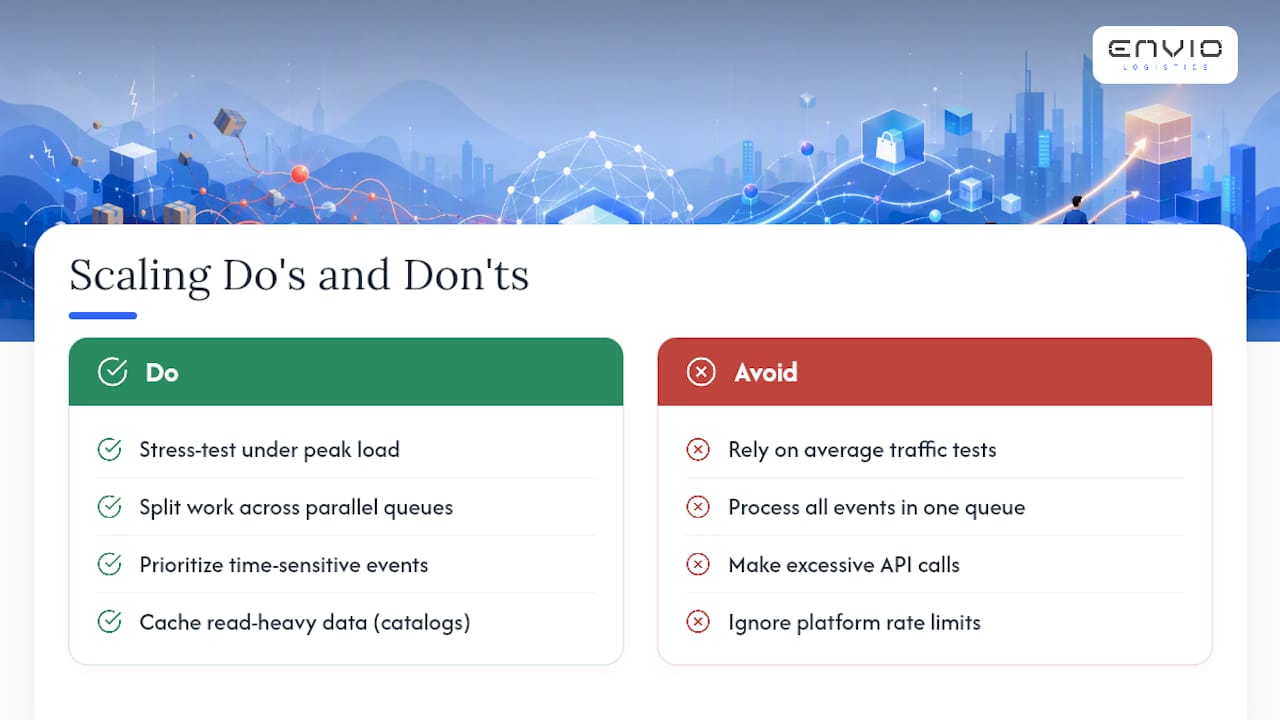
The most common bottleneck is API rate limits. Every platform, whether it’s Shopify, a marketplace, or a shipping carrier, caps how many requests you can make per minute. A batch job that worked fine at low volume can start hitting those limits as order counts climb, causing delayed syncs or outright failures during peak periods like a flash sale or the holiday shopping window.
Database and queue design matter just as much. Integrations that process events one at a time in a single queue will back up during traffic spikes, delaying every order behind the pile. Splitting work across parallel queues, prioritizing time-sensitive events like order confirmations over lower-priority ones like analytics updates, keeps the system responsive when volume surges.
Caching read-heavy data, like product catalogs that don’t change every minute, reduces unnecessary API calls and frees up rate limit headroom for the events that actually need real-time handling. A canonical data model, mentioned earlier as an architecture choice, also pays scalability dividends: normalized data is faster to validate and route than data that needs custom transformation logic on every single sync.
The practical takeaway for a growing store: test your integration under simulated peak load, not average load, before a big sales event catches you off guard. A system that handles Tuesday afternoon fine can buckle on Black Friday if nobody stress-tested it first.
Testing Strategies Before You Flip the Switch
Every integration needs three distinct environments: development, staging, and production. Skipping straight from development to production is how a mapping error ends up corrupting real customer orders instead of test data.
Unit testing validates individual pieces, does the SKU mapping logic correctly translate a bundle into its components, does the tax calculation match expected output for a given order. Integration testing checks that systems talk to each other correctly end to end, placing a test order and confirming it appears correctly in the WMS, ERP, and shipping system.
Load testing simulates high order volume to catch the performance bottlenecks described above before they hit real customers. User acceptance testing brings in the actual people who’ll use the system daily, warehouse staff, customer service reps, to confirm the integration behaves the way their workflow expects, not just the way the specification says it should.
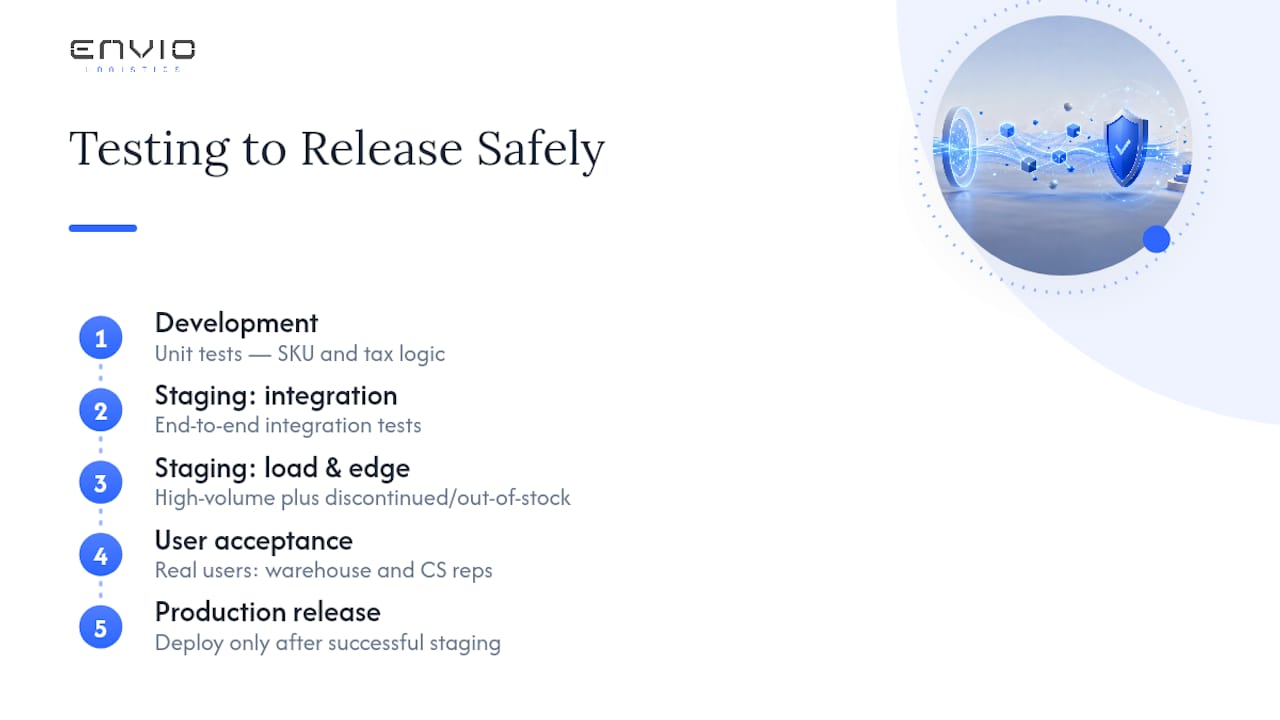
A staging environment with realistic sample data, not just a handful of test SKUs, catches far more problems than testing with clean, simplified data ever will. Include edge cases deliberately: an order with a discontinued SKU, a bundle with a component that’s out of stock, a refund on a partially shipped order. These edge cases are exactly where most integration bugs hide, and they rarely show up unless you test for them on purpose.
Managing Versions and Changes Without Breaking Production
Every system in your integration stack updates on its own schedule. Shopify pushes API updates, your ERP vendor releases a new version, your 3PL changes its data format. None of them ask permission first, and an integration built without version management will eventually break when one of these updates lands.
API versioning is the first defense. Most modern platforms, including Shopify, support versioned APIs, meaning you can pin your integration to a specific API version and upgrade deliberately rather than getting forced into changes on someone else’s timeline. Ignoring version pinning means a platform update can silently change field names or response formats and break your sync without warning.
Change management needs a process, not just good intentions. Before any connected system changes its schema or API version, someone should test that change in staging against your integration before it touches production. A simple change log, tracking what changed, when, and who approved it, makes troubleshooting far faster when something does break after an update.
Rolling back matters too. If a new integration version introduces a bug, having a documented way to revert to the previous working version buys time to fix the problem without leaving orders stuck. Vendor-managed integration services often handle this version tracking automatically, which is one of the practical reasons mid-market teams frequently choose managed connectors over building and maintaining everything in-house.
Real Examples of Integration Done Right
The clearest pattern in successful ecommerce integrations isn’t a specific technology choice. It’s the discipline of getting data ownership right before writing a single line of connector code.
A mid-sized apparel brand moving from manual CSV uploads to an event-driven inventory sync typically sees oversells drop within the first month, simply because stock counts update within seconds instead of once a day. The technical change matters less than the operational shift: warehouse staff stop discovering stockouts after a customer complains and start seeing them in real time.
Brands selling across Shopify, Amazon, and Walmart face a different challenge: keeping product data consistent across three sets of formatting rules. A PIM-driven approach, where product data lives in one canonical source and pushes out to each channel in its required format, eliminates the drift that happens when someone updates a product description on Shopify and forgets to mirror it on Walmart.
The through-line across working integrations is almost always the same: one clear system of record per data type, event-driven updates instead of batch polling wherever the platform supports it, and a monitoring setup that catches sync failures within hours instead of weeks. Stores that skip the planning phase and jump straight to connecting systems tend to spend the first six months firefighting data mismatches that a week of upfront mapping would have prevented.
Why Most Integration Advice Skips the Hard Part
The conventional advice on ecommerce integrations spends too much time on which tool to buy and not enough on the decision that actually determines whether a project succeeds: who owns the data. Every failed integration I’ve seen traced back in the research points to the same root cause, not a bad API or a buggy connector, but nobody deciding upfront whether the ERP or the storefront is the real source of truth for inventory counts.
The industry also oversells real-time everything. Event-driven architecture is the right default for inventory and order status, where a stale count causes a customer-facing problem. But not every data flow needs sub-second updates, and chasing real-time sync for low-priority data like historical analytics wastes engineering effort that should go toward hardening the connections that actually cause oversells and shipping delays.
If you take one thing from this guide, make it the SKU audit. Before you sign a contract with any middleware vendor or 3PL, spend a week reconciling SKU codes across every system you already run. It’s unglamorous work, and it’s the single highest-leverage thing a growing store can do before touching a connector.
— Claudio Saenz
A Simpler Path: Letting a 3PL Own the Integration Complexity
Every pattern covered here, event-driven sync, canonical SKUs, idempotent retries, still needs someone accountable for keeping it running. For a lot of growing brands, that someone doesn’t need to be an in-house engineer. Envio Logistics, Inc is built for exactly this handoff: instead of stitching together middleware, custom connectors, and a separate carrier account, brands get warehousing, DTC order fulfillment, and Amazon and Walmart prep under one connected system, with live inventory data visible the moment stock moves.
That matters most for stores adding a marketplace channel without a system to support the prep and labeling rules FBA and WFS require. Envio’s Amazon and Walmart prep services handle spec compliance directly, and the SKU profitability analysis tool turns the same inventory data feeding your integration into a decision about which products are worth scaling. Some fulfillment services offer same-day shipping for orders placed by early afternoon and may have flexible contract terms that do not require long-term commitments.
If oversells, fulfillment delays, or a growing pile of disconnected vendors are the actual problem, not the specific architecture, it’s worth comparing that against building and maintaining an integration stack yourself. Review Envio’s fulfillment services and request a quote to see what a pilot integration would look like for your order volume.
Sources
- Shopify — Data integration challenges
- NetSuite — What is ecommerce integration
- Harvard Business Review — A study of 46,000 shoppers shows that omnichannel retailing works
FAQ
What Are Ecommerce Integrations?
Ecommerce integrations are the connections that link your online storefront to backend systems like ERP, WMS, payment processors, CRM, and 3PLs so data such as orders and inventory updates automatically. NetSuite’s guidance describes this as eliminating the manual entry that otherwise causes reconciliation errors and delayed order processing.
What Are the Top Ecommerce Platforms for Integration?
Shopify, WooCommerce, and BigCommerce dominate the small to mid-market space, each offering varying levels of native connector support and API access. Shopify in particular has invested in webhook-based, event-driven integration support, which makes it a strong fit for stores prioritizing real-time inventory accuracy.
What Are the Main Types of Ecommerce?
Common categories include business-to-consumer (B2C), business-to-business (B2B), consumer-to-consumer (C2C), direct-to-consumer (DTC), subscription commerce, marketplace selling, and mobile commerce. Each type carries different integration priorities, a marketplace seller needs strong EDI and API support, while a subscription business needs tight recurring billing and CRM integration.
Which API Approach Works Best for Ecommerce?
REST APIs paired with webhook support for real-time events are the most widely adopted approach among major ecommerce platforms today. Shopify’s own recommendation favors event-driven API architecture over older batch or polling methods because it eliminates the sync delays that cause oversells.
How Do 3PL Integrations Fit Into an Ecommerce Stack?
A 3PL integration connects your storefront and order management system directly to a fulfillment partner’s warehouse, exchanging order details, inventory counts, and tracking updates automatically. Services like Envio’s 3PL and warehousing fold this connection into a broader fulfillment operation, so brands get live inventory visibility without maintaining a custom integration themselves.
0 comments